

What is SimpleSMDR?
LATEST UPDATE!
I have rebuilt this application in Python, simplifying the program to use the Python Flask webserver instead of the .NET to provide a simple searchable interface to your call data.
SimpleSMDR is an application to help you make sense of your PBXs SMDR data. I created this because I wanted to find an easy way of collecting, sorting and reporting on the huge amount of call data streaming out of my customer's PBX. I did not need the elaborate system to provide billing, traffic analysis etc that I found other applications provided, I just wanted to see what calls were being made to make sure the Telco was not charging me for calls I did not make! Currently the appliance will only work with Mitel PBXs but it can be easily configured to work with any PBX if you know the format of your PBX data.
How does it work?
SimpleSMDR is an application that monitors the SMDR data IP port on your PBX and captures the streaming call data. This application strips the relevant data from the stream and places it into a SQlite database. The application then provides a simple interface for searching and reporting on this data via the local system URL https://localhost:5000
How to get it
This is the easy part, to get SimpleSMDR up and running for your office, just download the zipped appliance , expand it to you local drive. Edit the config.ini file to ensure you have the correct IP address of your Mitel PBX and then run the application executable simplesmdr.exe.
The alternative is to download the Linux VM. Once it is downloaded, open the VM with VMware Workstation player and ensure you select "Moved it" so the network interface maintains the MAC address. Once it is booted you will see the IP address that the server has picked up from your DHCP server and you can connect to the webpage using http://xxx.xxx.xxx.xxx/index.php (where the xxx... is the IP address the VM has been assigned). The only other thing you need to do is to set the PBX IP Address as described below.
Configuration instructions
The first step in configuring the application is to set your PBX IP address in the config.ini file instead of the default 192.168.1.2 leaving all other parameters as they are. If you are using a Mitel PBX you should leave the port number at 1752, that is the default port for Mitel PBXes. The next step is to ensure that your Mitel PBX is configured with the correct SMDR Options enabled. I have added a screenshot of the options that you will need to turn on. If you are unsure how to configure this please ask your Mitel support partner to assist you with this as it is extemely important to have this form configured accurately or your data will not be recorded correctly.
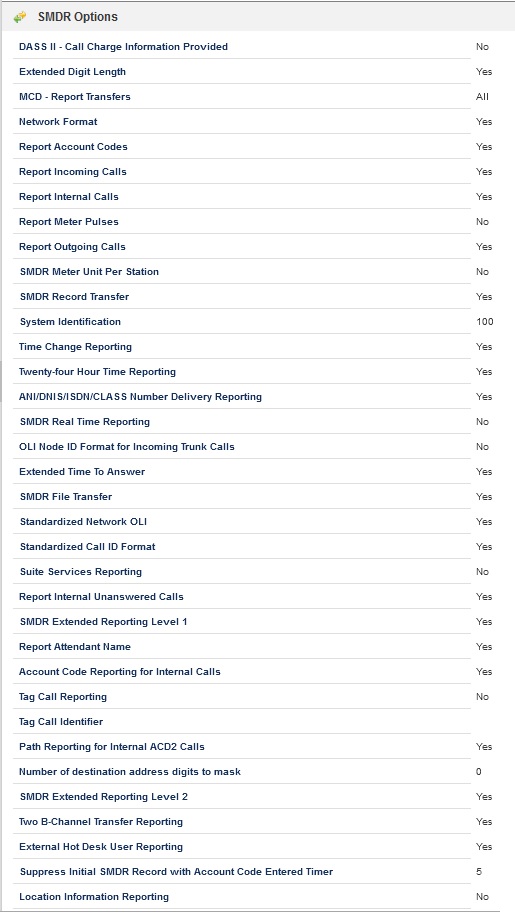
Once you have got the configuration completed in the PBX and the IP address of the PBX set in the configuration page you are ready to start the capturing of the data. To do so you need to run the "simplesmdr.exe" executable from the directory that you extracted the application into.